Technical Inspection Agency
(TÜV) Saarland, 05/2009


Wikipedia articles about SaferSurf and Delphish:
en.wikipedia.org/wiki/SaferSurf
fr.wikipedia.org/wiki/SaferSurf
it.wikipedia.org/wiki/SaferSurf
hr.wikipedia.org/wiki/SaferSurf
sr.wikipedia.org/wiki/SaferSurf
en.wikipedia.org/wiki/Delphish
fr.wikipedia.org/wiki/Delphish
it.wikipedia.org/wiki/Delphish

SaferSurf - your Worry-Free Safety Package for eMail and web. Surf the web more secure and faster. Sign up now.
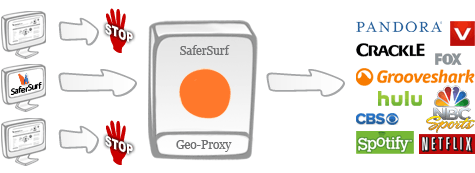
Services like Hulu, Pandora, YouTube or Groovesherk try to block content from their users. Using SaferSurf GeoProxy you have legal an unlimited access to all services.
Every time you dial in to the internet you are assigned an IP address by your internet service provider. This IP address tells the websites and service providers in which geographical area you are located. This technology is called geolocation technology or geotargeting. Music and video portal providers block their content if the IP address tells you are not located in the US or another specific country.
More and more content providers start publishing TV shows in the internet. Most TV shows will be published in their original county up to one year before they are on TV in other countries. Most of this content though cannot be accessed from outside the country of origin. Using SaferSurf you will be free to choose from a variety of global IP addresses, so that you can access the content freely, no matter where in the word you are located.
SaferSurf lets you choose between different global IP addresses. You can do so by just clicking on the country you want to use and in an instant you will be provided with that country’s ID. We offer a wide variety of IP addresses all around the globe.
SaferSurf Unblock lets you bypass firewalls and other net restrictions, without having administrative rights on the PC you use. Unblock websites at your workplace and bypass internet restrictions in cybercafés, hotels, or at airports. The unblock service will work with any different PC. Read more